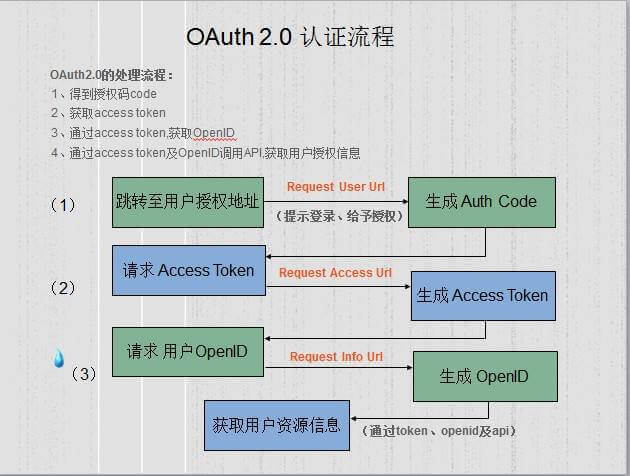
要使用github授权登录,需要先去github网站创建你的Oauth APPs,打开下面页面
https://github.com/settings/developers (settings-> Developer settings-> OAuth Apps)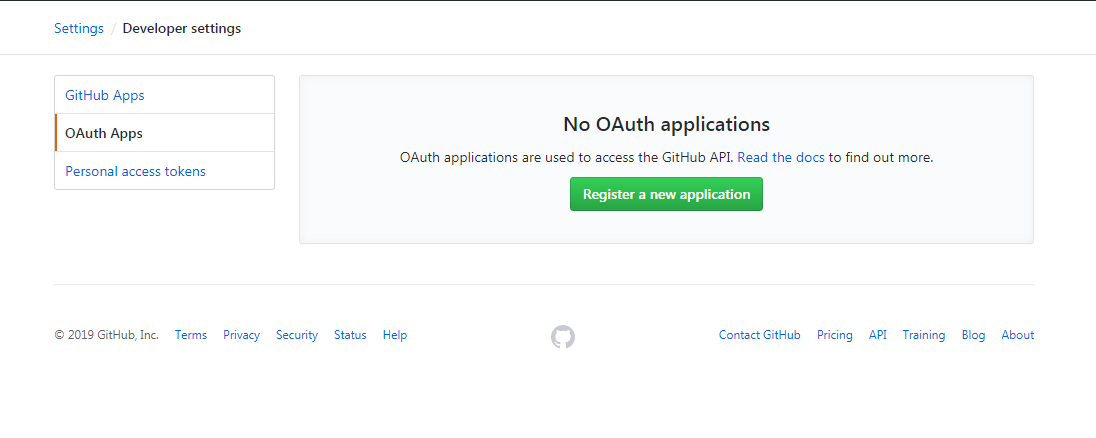
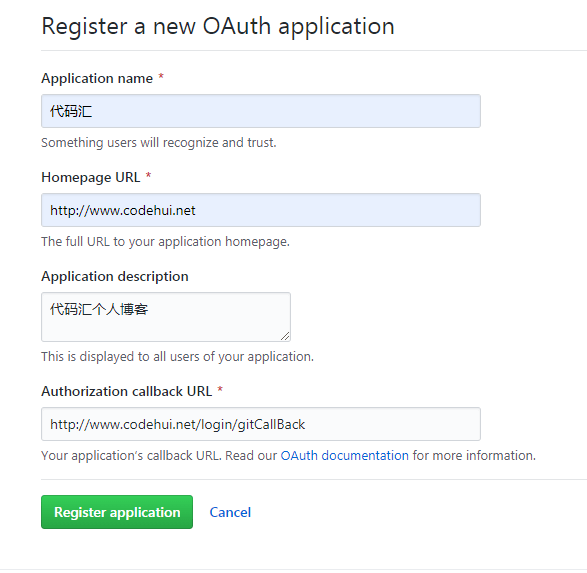
点击Register a new application创建应用,填入应用的信息和回调地址
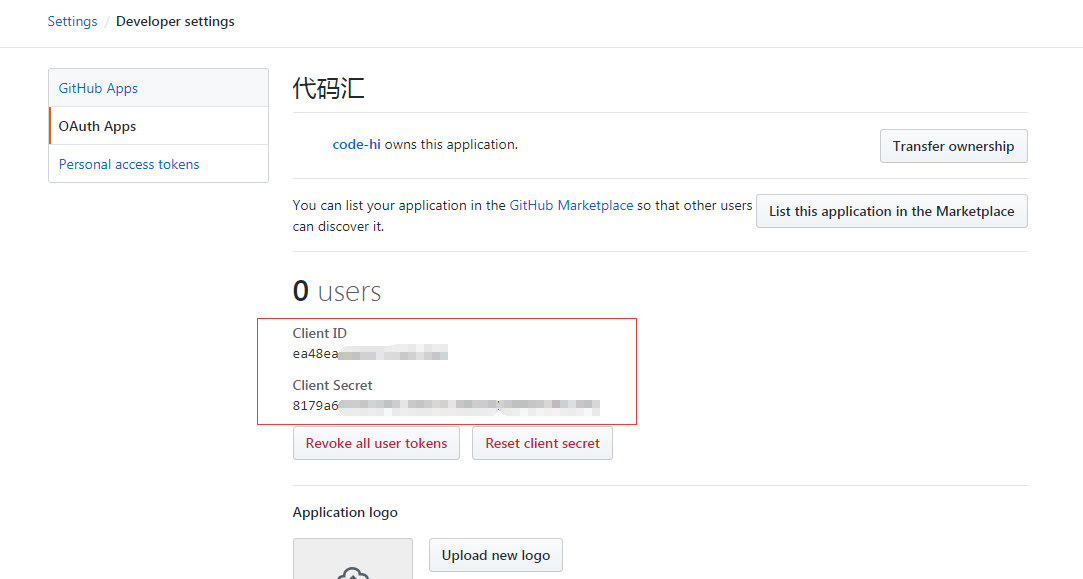
提交后就会看到分配给应用的Client ID和Client Secret,在这里可以上传应用的图片
流程
文档地址:https://developer.github.com/apps/building-oauth-apps/authorizing-oauth-apps/
如果你对oauth2.0协议了解了,就会发现每个平台的授权登录流程都大同小异
- 跳转到授权页面,用户同意授权后获取code,code有效期10分钟
GET https://github.com/login/oauth/authorize
参数:
| 名称 | 类型 | 描述 |
|---|---|---|
| client_id | string | 必填。您在注册时从GitHub获取收到的Client ID 。 |
| redirect_uri | string | 用户授权后回调跳转地址,不传的话使用应用配置填的URL |
| login | string | 建议用于登录和授权应用程序的特定帐户。 |
| scope | string | 以空格分隔的范围列表。可选择获取哪些数据。详细 |
| state | string | 随机字符串,防止跨站点请求伪造攻击。 |
| allow_signup | string | 是否为未经身份验证的用户提供了在OAuth流程期间注册GitHub的选项。默认是true。false在策略禁止注册的情况下使用。 |
- 用户同意授权后,携带code跳转回回调地址,使用code获取access_token
POST https://github.com/login/oauth/access_token
参数
| 名称 | 类型 | 描述 |
|---|---|---|
| client_id | string | 必填。 您在注册时从GitHub获取收到的Client ID |
| client_secret | string | 必填。 您从GitHub收到的GitHub应用程序的Client Secret |
| code | string | 必填。 上一步收到的code |
| redirect_uri | string | 回调地址 |
| state | string | 上一步的随机字符串,防止跨站点请求伪造攻击 |
将会返回access_token,格式如下
access_token=e72e16c7e42f292c6912e7710c838347ae178b4a&token_type=bearer
- 然后使用access_token获取用户信息
Authorization: token OAUTH-TOKENGET https://api.github.com/user
注意这块最新v3版本要在这块加上GitHub用户名或应用程序名称作为User-Agent标头值,文档地址
User-Agent: Awesome-Octocat-App
示例代码
(使用方法)在最后面
<?php/*** Github授权登录* @param $client_id GitHub oauth应用的Client ID* @param $client_secret GitHub oauth应用的Client Secret* @param $app_name GitHub用户名或应用程序名,作为User-Agent标头值* @author codehui <admin@codehui.net> 2019-07-22*/class GitOauth {const GET_AUTH_CODE_URL = "https://github.com/login/oauth/authorize";const GET_ACCESS_TOKEN_URL = "https://github.com/login/oauth/access_token";const GET_USER_URL = "https://api.github.com/user";private $client_id;private $client_secret;private $app_name;public function __construct($client_id, $client_secret, $app_name = 1) {if($client_id && $client_secret){$this->client_id = $client_id;$this->client_secret = $client_secret;$this->app_name = $app_name;} else {$this->error('101', '缺少必要参数');}}/*** 授权页面*/public function gitLogin() {// 生成唯一随机串防CSRF攻击$state = md5(uniqid(rand(), TRUE));session('state', $state);$uri = $this->combineURL(self::GET_AUTH_CODE_URL, ["client_id" => $this->client_id,"state" => $state,"scope" => 'read:user%20user:email']);header("Location:$uri");}/*** 获取信息* @return array*/public function getInfo(){$token = $this->getToken();if (isset($token['errcode'])){return $token;}$info = $this->getUser($token['access_token']);return $info;}/*** 获取access_token* @return array*/public function getToken() {// 验证state防止CSRF攻击if (!$_REQUEST['state'] || $_REQUEST['state'] != session('state')){return $this->error(0, 'state验证失败');}$response = $this->httpsRequest(self::GET_ACCESS_TOKEN_URL, ['client_id' =>$this->client_id,'client_secret' => $this->client_secret,'code' => $_REQUEST['code']], 'POST');$params = [];parse_str($response, $params);if(isset($params['error'])){return $this->error($params['error'], $params['error_description']);}return $params;}/*** 获取用户信息* @param $access_token 上一步获取到的access_token* @return array*/public function getUser($access_token) {$response = $this->httpsRequest(self::GET_USER_URL, [], 'GET', ["User-Agent: {$this->app_name}","Authorization: token {$access_token}"]);$response = json_decode($response);if(!isset($response->login)) {return $this->error(105, $response);}return $response;}/*** 错误信息* @param int $code 错误代码* @param string $info 描述信息* @return array*/public function error($code = 0, $msg = ''){return ['errcode' => $code,'errmsg' => $msg];}/*** 拼接url* @param string $baseURL 请求的url* @param array $keysArr 参数列表数组* @return string 返回拼接的url*/public function combineURL($baseURL, $keysArr) {$combined = $baseURL . "?";$valueArr = [];foreach($keysArr as $key => $val){$valueArr[] = "$key=$val";}$keyStr = implode("&", $valueArr);$combined .= ($keyStr);return $combined;}/*** 获取服务器数据* @param string $url 请求的url* @return unknown 请求返回的内容*/public function httpsRequest($url, $keysArr = [], $type = 'GET', $header = []) {$curl = curl_init();curl_setopt($curl, CURLOPT_URL, $url);curl_setopt($curl, CURLOPT_CUSTOMREQUEST, $type);curl_setopt($curl, CURLOPT_SSL_VERIFYPEER, FALSE);curl_setopt($curl, CURLOPT_SSL_VERIFYHOST, FALSE);curl_setopt($curl, CURLOPT_RETURNTRANSFER, 1);if ($header) {curl_setopt($curl, CURLOPT_HTTPHEADER, $header);}if ($type == 'POST') {curl_setopt($curl, CURLOPT_POST, 1);curl_setopt($curl, CURLOPT_POSTFIELDS, $keysArr);}$output = curl_exec($curl);curl_close($curl);return $output;}}
使用方法
// 跳转到授权页面$git = new GitOauth('Client ID', 'Client Secret', 'app_name');$git->gitLogin();// 回调方法$info = $git->getInfo();echo json_encode($info);
返回数据如下,可以使用node_id作为用户识别码
{"login": "octocat","id": 1,"node_id": "MDQ6VXNlcjE=","avatar_url": "https://github.com/images/error/octocat_happy.gif","gravatar_id": "","url": "https://api.github.com/users/octocat","html_url": "https://github.com/octocat","followers_url": "https://api.github.com/users/octocat/followers","following_url": "https://api.github.com/users/octocat/following{/other_user}","gists_url": "https://api.github.com/users/octocat/gists{/gist_id}","starred_url": "https://api.github.com/users/octocat/starred{/owner}{/repo}","subscriptions_url": "https://api.github.com/users/octocat/subscriptions","organizations_url": "https://api.github.com/users/octocat/orgs","repos_url": "https://api.github.com/users/octocat/repos","events_url": "https://api.github.com/users/octocat/events{/privacy}","received_events_url": "https://api.github.com/users/octocat/received_events","type": "User","site_admin": false,"name": "monalisa octocat","company": "GitHub","blog": "https://github.com/blog","location": "San Francisco","email": "octocat@github.com","hireable": false,"bio": "There once was...","public_repos": 2,"public_gists": 1,"followers": 20,"following": 0,"created_at": "2008-01-14T04:33:35Z","updated_at": "2008-01-14T04:33:35Z","private_gists": 81,"total_private_repos": 100,"owned_private_repos": 100,"disk_usage": 10000,"collaborators": 8,"two_factor_authentication": true,"plan": {"name": "Medium","space": 400,"private_repos": 20,"collaborators": 0}}